
The Art of Logging (Without Losing Your Mind)
15 July 2025
The quieter days of summer are a great time to start new habits, especially ones you've been meaning to try but couldn't squeeze in during the busier months. If you haven't been logging your work, today is a great time to start.
So, you've picked up a new notebook and you're ready to begin.
Yikes! The blank page is staring back at you.
How much do you write? What do you leave out? How do you organize it so it's useful, not overwhelming?
Logging can be both a powerful memory aid and a form of documentation. It helps you remember what you did, how you did it, and what didn't go as planned. But it doesn't have to be perfect. In fact, it shouldn't be.
Why Log at All?
Memory is fragile. Even a few days later, it’s easy to forget what you worked on, what decisions you made, or why something didn’t work. A log gives you a breadcrumb trail back to your thought process. It’s not just about accountability; it’s about clarity.
Think of it like debugging your own brain. Just like software logs have different levels: trace, debug, warn, error, fatal; your work log can reflect different depths of detail. Some days you’ll jot down a quick summary. Other days, you’ll need to unpack a problem or track a series of steps.
How I Log
I've refined my system over time, drawing inspiration from the Bullet Journal method, though I started long before it was first posted online. What's key is that I've adapted it to suit my workflow; and you should feel free to do the same.
Here's what I do:
- Start with the date. I write this once per day.
- List the project or client. I use short codes and abbreviations for recurring work.
- Each line is a new event. I might combine similar tasks or break them out depending on how much detail I need.
- Use symbols to track status. Here are a selection of ones I often use when logging.
- • for a task
- / for a task in progress
- x for completed
- > for postponed
- ^ for finished early // this symbol occurs more frequently in my planner
- – for notes
- ○ for events // for example, a client call
- // for comments
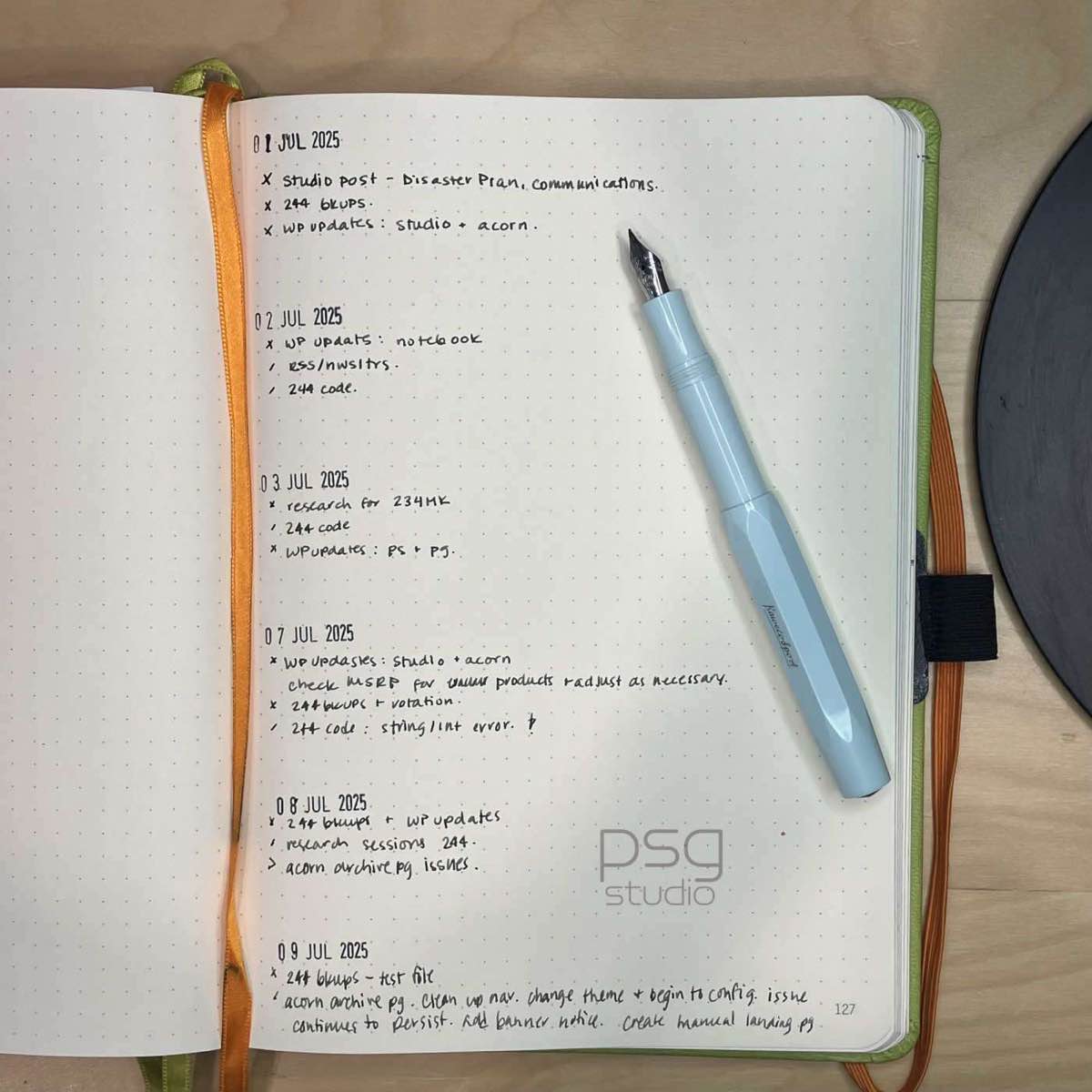
Here’s a sample from my log:
08 Jul 2025

x 244 bkups & WP updates

/ research sessions 244

> acorn archive pg issues
It's not always neat. There are cross-outs, spelling errors, ink smudges, and inconsistent spacing. What you see in this image is a cleaned-up version1. The real thing is very messy, because work is messy.
Don't Let Perfectionism Get in the Way
Some systems, like the Bullet Journal, began as simple logging tools but have since evolved into elaborate art journals. That's wonderful if it brings you joy; however, it can also be intimidating. You don't need perfect spreads or color-coded layouts to make your log useful. In fact, I no longer color-code at all.
On the digital side, Personal Knowledge Management (PKM) tools, especially those designed to build a "second brain", can lead to over-logging. When you're linking every note, tagging every thought, and constantly moving on to the next, you're not necessarily safeguarding your memory. As Joan Westenberg writes in her essay I Deleted My Second Brain, what we often think of as preserving is actually deferring.
There's value in trusting that the important parts will come back to you. When we stop trying to capture everything, we give ourselves space to work with the memory we have. In Jewish tradition, the word zachor means not just to remember, but to act on that memory. It's a reminder that memory is not passive; it's active, lived, and imperfect.
May we work with what we have: messy, incomplete, and real.
Keep It Simple, Keep It Useful
The goal isn't to create a beautiful archive; you want to support your thinking. This log is for you. It can be rough, inconsistent, and incomplete (though we hope not too many gaps exist). What matters is that it helps you remember, reflect, and move forward.
Some tips to keep in mind:
- Leave space between days if you want to add updates later.
- Create project-specific pages when a task grows into something bigger.
- Use a shorthand that makes sense to you. You can always refine it later. My system is always evolving.
- Don't stress about consistency, aim for clarity.
Logging your work is a practice, not a product. It evolves with you. Start small, stay flexible, and don't let the aesthetics or complexity of other systems stop you from building your own.
You don't need a perfect log. You need one that works for and with you.
Recommended products
For More Info
- another way to document, as you go (3 July 2019)
- 3 Tips to Organize Your Notebook (2 April 2021)
- Organizing Communication … with Yourself (30 April 2021)
- codes of a different kind (2 March 2018)
- Bullet Journal
- I Deleted My Second Brain by Joan Westenberg (Jun 16, 2025)
- Because otherwise I'd have to spend time blurring and editing the image. It was faster to rewrite and make a few edits along the way. I tried to make it messy and it just doesn't happen!